How Pie works
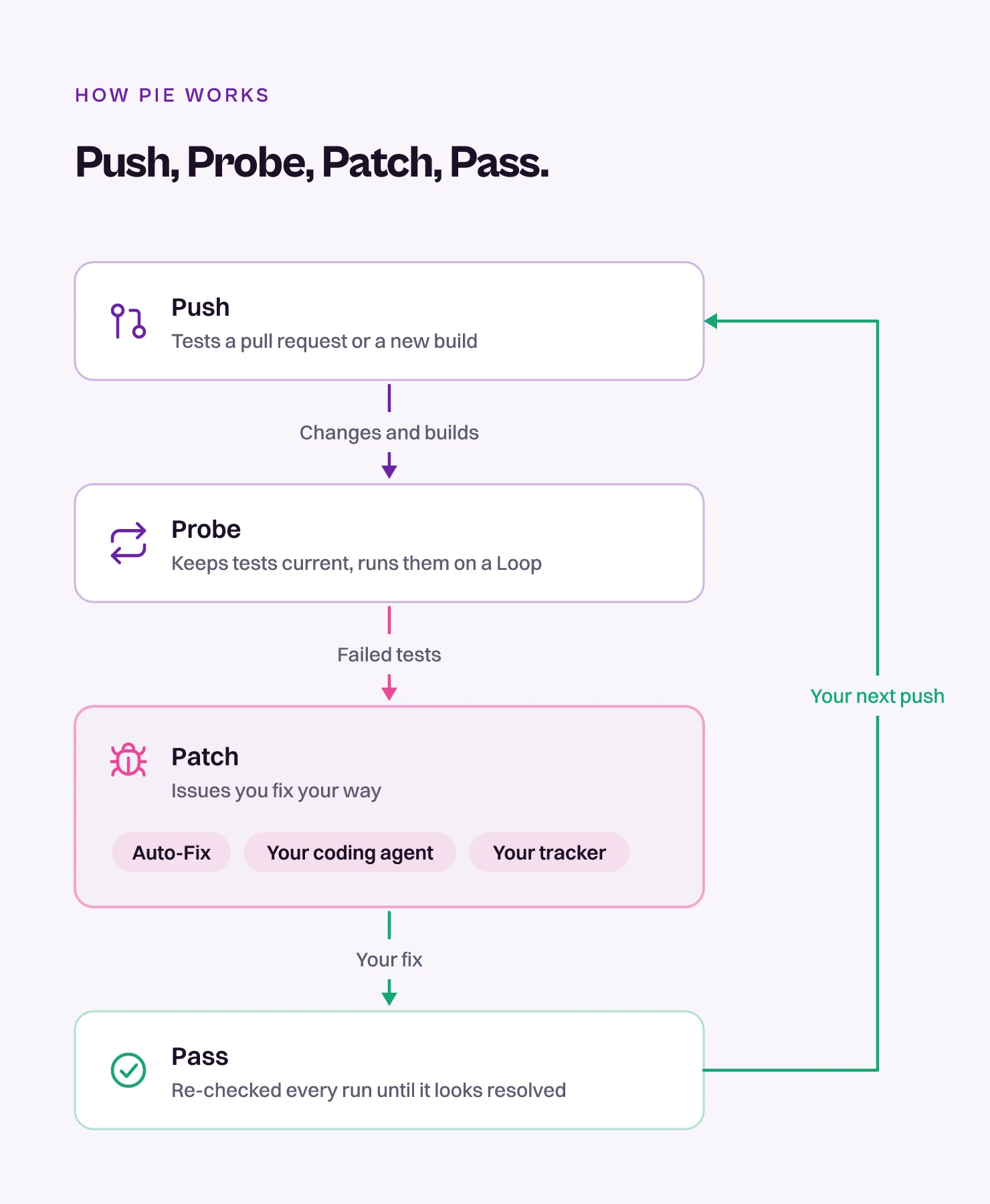
Pie is an agentic testing platform for web, iOS and Android apps. Every change goes through four steps: Push, Probe, Patch, Pass. Push a change or a build and it gets tested. Fix what broke with Auto-Fix, your coding agent or your tracker, and it’s re-checked until it passes.
Pie tests a web app from its URL and a native iOS or Android app from a simulator build. Each step leaves something you can open in the portal, such as test cases, runs and issues.
The four steps repeat with every change, and Pie Loop keeps them running for you. It runs your suites on a schedule, on every new build or when your CI calls the API.
Push
Push hands Pie something new to test. However a run starts, Probe, Patch and Pass work the same.
- A pull request. With your repository connected, Pie tests it on its preview before you merge. Pie Bot reads the change, generates targeted tests from the diff, runs them against the preview and posts pass or fail results on the pull request. On GitHub, it can run when a pull request opens or gets a push. Ask your Pie contact to turn that on. Draft PRs are skipped. You can always start a test by commenting
@pie-pr-bot teston the PR. On GitLab, comment/pieon the merge request. - A new build. Upload a build in the portal or from your CI, and a Loop set to run on a new build starts the suites you chose.
- A schedule or a CI call. A Loop can also run your regression suites on a schedule or when your pipeline calls the API. You can start a run by hand too, from the portal, Chat or your agent.
See Test PRs, Connect GitHub or GitLab and Create a Loop.
Probe
Pie keeps your tests in step with what you merge and runs them on a Loop.
Your tests
- Discovery. Pie explores your app the way a user would, visiting screens and mapping the flows it finds. See Map your app.
- Key features. The areas discovery finds, such as sign-in or checkout. They group your test cases and appear in the Key Features card on the Dashboard.
- Test cases. Plain-language steps plus the assertions Pie checks at the end. Pie writes them, and you can add or edit your own. See Create and edit test cases.
- Test suites. Groups of test cases that you run together. You create them in the portal, in Chat or through the API. See Organize tests into suites.
Test cases describe intent in plain language, such as “click the login button”, so for supported tests nobody writes or maintains selectors.
Keep tests current
PR scan is a setting in a Loop. Each time the Loop runs, Pie reads the PRs merged in the scan period, writes tests for what’s new, revises the tests those changes touch, then fills the rest of the Loop’s test limit with tests from your suites. New and updated tests wait in the PR scan inbox for your review, and nothing changes in your suites until you accept it. See Add PR scan to a Loop.
Pie measures coverage in your product’s terms: the key features it found and the user flows under each one. It doesn’t count lines of code. To widen coverage, write a test case for a flow Pie missed, or run a coverage scan over recent changes.
Run on a Loop
Set up a Loop to run the suites you choose on a schedule, on every new build or when your CI calls the API. You can also start a run by hand from the portal, Chat or your agent.
Each run executes your test cases against a URL or a build and records a result for every test, with step screenshots. See Create a Loop and Read a run.
Patch
When a test fails, Pie tells you what broke, and you decide how to fix it.
- Findings. A finding is one detection of a possible bug, in one test of one run.
- Issues. Pie groups findings with the same cause into one issue: one app-level bug with its expected and observed behavior and the steps to reproduce it.
Pie tracks each issue across runs. A bug that shows up in ten tests, or in every run until someone fixes it, is tracked as one issue across runs.
For each issue, track it if it’s a real bug, or dismiss it if it’s already fixed or not real. See Triage issues. Then fix the real bugs your way:
- Auto-Fix. On the issue, select Fix in the Auto-Fix panel. Pie first checks that the issue is a real bug. If it is, Pie opens a PR with a proposed fix for your team to review and merge. If it isn’t, Pie rejects the issue and says why. Auto-Fix needs Pie Bot on your repository (see Connect GitHub or GitLab) and code access, which your Pie contact turns on. See Fix it with Auto-Fix.
- Your coding agent. Hand the issue to an agent such as Claude Code. It gets the steps and the expected and observed behavior. See Fix bugs with your agent.
- Your tracker. Send the issue to Jira, Linear or Asana. See Triage issues.
Pass
Pie re-checks each tracked issue on every run. When its repro test no longer finds the bug, the issue shows Looks resolved, and you can mark it resolved. The Loop starts again with your next change.
The Readiness Score on the Dashboard sums up where the app stands: one number for how launch-ready it is, based on the severity of its issues. See Tour the dashboard.